
One click
Put your tabs away
Forty tabs you'll read later? A hundred? Put them away: each one is saved into a folder, named after its tab group or sorted by site, and closed, so your tab strip only holds what you're using now.
Or put away just the tab you're on (right-click the page), the ones you tick, or drag a single tab into a folder.

Folders
Bring any back in a click
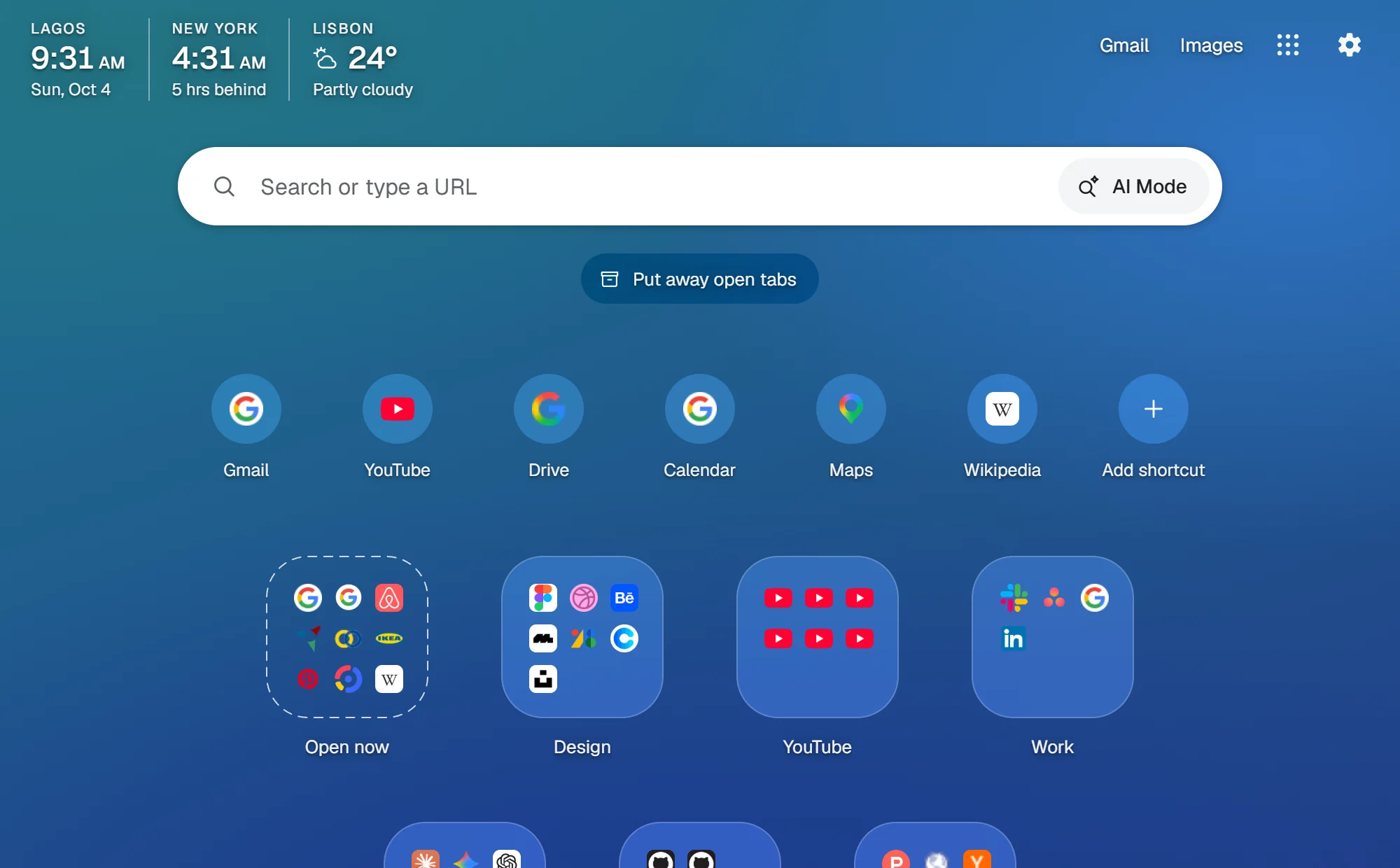
Folders show their tabs' icons, like app folders on a phone. Open one tab or the whole folder, or search: Foldaway finds any tab you've saved and tells you which folder it's in.
Put something away by mistake? Undo puts tabs back exactly where they were, in the same window, place and tab group.

Import
Bring your tabs along
Coming from OneTab, Toby or Session Buddy? Paste OneTab's list, or import their export files or any browser's bookmarks, and your tabs arrive as folders.

Your page
Make it yours
It looks like Chrome's own new tab page, or pick light, grey or dark, a soft gradient, or a picture of your own, whose colours Foldaway can take on.
Add a clock, a second clock for another place, and the weather for your city, if you'd like them.
And the little things
- Idle tabs sleep
- Tabs you haven't used for a while hand their memory back, and big folders reopen without loading every tab at once.
- What matters stays open
- Pinned tabs, tabs playing sound, video calls and the sites you choose are never put away.
- Keyboard first
- Alt+T opens your folders, Alt+Shift+O puts everything away, and every part works with a screen reader.
- Backups that keep up
- Export to a file, or keep a copy in your Chrome bookmarks that updates itself, and syncs if Chrome sync is on.
- Beside your other new tab
- Already using another new tab extension? Foldaway's toolbar button still opens your folders.
- Quick with a big hoard
- Tested with 20,000 saved tabs, and still quick to open.
Your tabs stay on your computer
Foldaway has no server and asks for no account. Your folders live in Chrome's storage on your computer, and in your Chrome bookmarks only if you turn that on.
Read the privacy policy- No account to make
- No server: nothing of yours is uploaded
- No tracking, no analytics, no ads
- Only the weather sends anything, and only if you turn it on
Questions
Something else, or something not working? Get help or report a problem.
Where are my tabs kept?
On your computer, in Chrome's storage for Foldaway. Settings → Backup can export everything to a file whenever you like, or keep a copy in your Chrome bookmarks that stays up to date by itself (and syncs with your Google account if Chrome sync is on).
What happens to my folders if I remove Foldaway?
Chrome deletes Foldaway's storage with it, so export a backup first. A copy in your bookmarks stays, and Foldaway can bring your folders back from it.
I already use another new tab extension. Can I keep it?
Yes. Chrome gives the new tab page to one extension at a time; if another one has it, Foldaway's toolbar button (and Alt+T) still opens your folders in a tab of their own.
Can I bring my tabs from OneTab, Toby or Session Buddy?
Yes: Settings → Backup → Import reads their export files, a list pasted from OneTab, or any browser's bookmarks file.
Does Foldaway cost anything?
No. It's free, with no account to make.
What does the weather send?
Nothing unless you turn it on. Then your city's rough position goes to MET Norway for the forecast, and what you type to find your city goes to Photon, a place search. The privacy policy has the details.